Violetto: The Elegant Handwritten Font for Creative Product Makers
I was standing in my small studio, a fresh batch of soy candles cooling on the table, and I felt stuck. My usual bold, modern font for the labels just wasn’t matching the soft, lavender scent I had crafted. I needed something with grace, something that felt personal and luxurious. That’s when I found Violetto. As I typed my candle’s name, “Evening Meadow,” into my design software and switched to this font, it clicked. The letters flowed with a gentle, calligraphic sway, each connection feeling intentional yet effortlessly fresh. The label transformed from a simple identifier to a piece of the product’s story.
The Soul of Violetto: A Font with Creative Personality
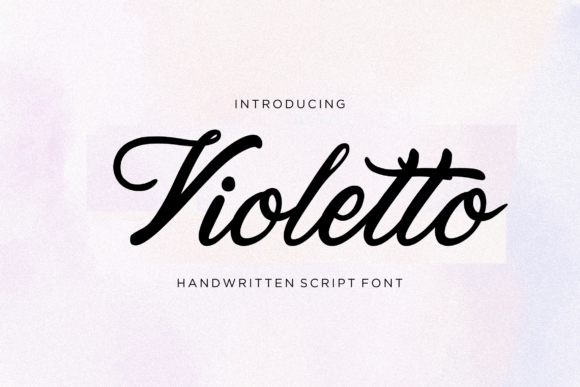
What makes Violetto so special for makers like us is its balanced personality. It carries the timeless elegance of classic penmanship—you can see the refined strokes and the artful variation in the letterforms. Yet, it avoids feeling overly formal or dated. There’s a contemporary lightness to it, a cleanliness that makes it perfectly suited for today’s aesthetic, whether you’re designing for a rustic farmhouse style or a minimalist modern brand. It has a warm, inviting charm. When you use Violetto on a product, it doesn’t just display words; it conveys a mood of thoughtful craftsmanship and genuine care.
Bringing Your Products to Life with Violetto
The true test of a font is how it performs in the real world, on the actual items we sell or gift. Violetto has become my go-to for elevating the presentation across my entire shop.
Physical Products & Packaging
For my candle labels and beeswax wrap packaging, Violetto is perfect for the product name and short, evocative descriptors. Its elegance instantly raises the perceived quality. On cotton tote bags and ceramic mugs, where I use my heat press, the font’s clean lines transfer beautifully, whether I’m printing a single word like “Gather” or a longer phrase. It reads clearly even at smaller sizes, which is crucial for detailed product tags on handmade jewelry or small boutique apparel tags.
Stationery & Event Design
When a client requested custom wedding invitations, Violetto was the cornerstone. We used it for the couple’s names and the main headings on the invitation suite. Its romantic flow was ideal for the welcome sign and seating chart mockups. For my line of printable greeting cards and seasonal party invitations, Violetto adds that handmade touch digitally. It makes “Happy Birthday” or “Merry Christmas” feel personally written, not just digitally generated.
Digital & Printable Creations
For printable wall art, like inspirational quotes for a home office, Violetto gives the design an artistic anchor. In planner pages and sticker sheets designed for Silhouette or Cricut cutting, I use it for decorative headers and accent words. The font’s distinct style ensures my digital downloads have a cohesive, recognizable look across my store listings and preview images.
Designing for Readability and Impact
Violetto is a display font, and it excels in its primary role: making beautiful impressions. It’s best suited for shorter text, names, titles, logos, and decorative wording. I use it for my shop’s logo, product titles on labels, and key phrases on signage. For longer paragraphs, like the detailed instructions on a printable or the story on my website, I pair it with a simple, clean sans serif font. This combination ensures the beauty of Violetto captures attention, while the supporting font provides effortless readability.
Always test readability for your specific use. On a small sticker or a detailed SVG for a cutting machine, check your mockup at the actual print or cut size. For a wedding invitation printed on textured paper, a slightly larger size ensures the elegance isn’t lost. On a dark background for a shop sign, I often add a slight letter spacing to let each graceful character stand out clearly.
A Practical Checklist for Makers Before You Start
Before integrating Violetto into your commercial products—whether they’re physical goods like mugs and cards or digital items like templates and printables—a few practical checks will set you up for success.
- File Formats & Compatibility: Confirm the font package includes the file formats you need (like OTF, TTF, or possibly SVG-friendly outlines) for your design software, cutting machine software, and printing processes.
- Character Set & Support: Look at the included glyphs. Does Violetto have the alternates, ligatures, or swashes that allow you to customize words for a truly unique look? Check for multilingual support if your market requires it.
- Commercial License: This is essential. Verify your license allows you to use Violetto on the physical products and digital downloads you intend to sell. A proper commercial license protects your business and respects the font creator’s work.
- Pairing Partners: Explore pairing Violetto with a simple sans serif for body text or a complementary serif for a more classic editorial feel, like in a newsletter or booklet. Having these design assets ready creates a cohesive brand identity.
The Final Creative Impression
Using Violetto is more than just selecting a typeface from a menu. It’s about choosing a creative partner that carries your product’s intent. From the moment I saw it grace that first candle label, it changed how I approach design. It brings a consistent emotional appeal to my line—a touch of sophisticated handmade warmth that customers recognize. Whether you’re etching it onto a wooden sign, printing it on linen paper, or setting it as the headline on your website’s shop banner, Violetto has the versatile charm to become a true favorite in your creative toolkit, helping your work stand out with its classy, contemporary flow.